AI agents offer an innovative way to handle customer inquiries efficiently and automate standard processes.Thanks to flexible configuration, agents can be precisely tailored to individual requirements. The setup is done in a few, clearly structured steps, which are described under the tabs detailed above.
Here the foundation for the AI agent is laid. This includes:
Name: The agent’s name should reflect its area of responsibility, e.g., “Prepayment-Agent”.
Description: A brief description helps to grasp the purpose of the agent at a glance.
Topic: The topic results from the existing skill tags. For example, a Prepayment-Agent could be assigned the skill tag “Payment Transactions”. This assignment ensures clear organizational allocation and simplifies, for instance, access via the template catalog.
Channels: Determine through which communication channels the AI-Agent should act – email, chat, mail, phone, etc. An agent can easily be assigned to multiple channels.
The personality of the AI agent defines how it communicates – not only content-wise but also in tone. The communication style can be finely adjusted using intuitive sliders:
Informal to formal: Should the AI agent appear casual or businesslike?
Speaking style: From concise responses to detailed explanations.
Concise to comprehensive: Determines the level of detail in feedback.
These adjustments ensure that the AI agent perfectly matches the company language and positively supports the customer experience.
**All specifications – name, topic, intelligence, personality, and channels – can be flexibly adjusted at any time. This keeps the AI Agent dynamic and always adapted to current requirements.
If this option is enabled, requests from non-authenticated customers will be ignored by the AI agent. This setting is particularly suitable for processes that involve sensitive data or require customer verification.
Different methods are available for assigning AI agents:
AI Recognition
AI-based recognition is based on machine learning. Instructions help the AI agent to identify patterns in customer requests. A clear and precise instruction improves the recognition accuracy of the AI agent.ExampleInstruction to the AI agent for customer concerns on the topic “SEPA Revocation”:
Condition Recognition
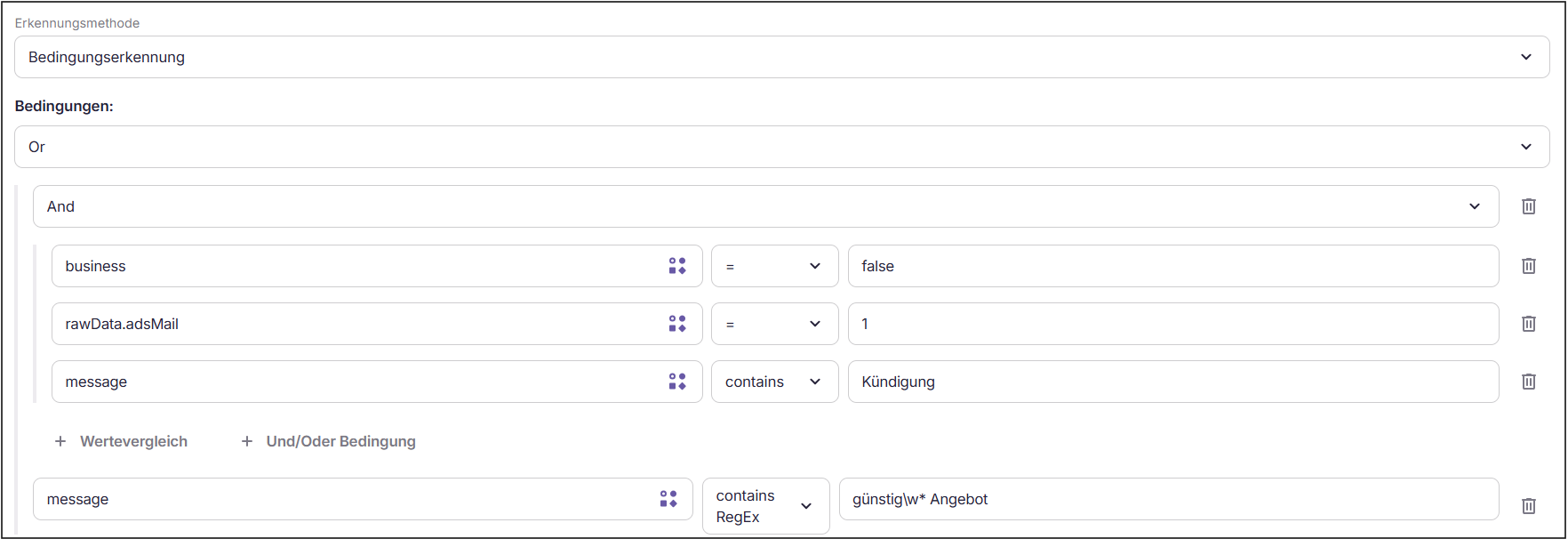
The AI agent is assigned based on ticket, customer and/or contract attributes. Conditions can be linked as desired.Operators and Expected Values
Operator
Expected Data Type
Effect
=
string, number, or boolean
Checks if the data point exactly matches the provided value.
!=
string, number, or boolean
Checks if the data point differs from the provided value.
contains
string
Checks if the data point contains the specified text.
not contains
string
Checks if the data point does not contain the specified text.
in
array
Checks if the data point is included in the specified list of values.
not in
array
Checks if the data point is not included in the specified list of values.
> / >= / < / <=
number
Numerically compares the data point with the specified value.
is null
null or no value
Checks if no value is present.
is not null
null or no value
Checks if a value is present.
contains RegEx
string
Checks if the data point matches a regular expression.
ExampleLinking of conditions for customer concerns for marketing purposes:
AI and Condition Recognition
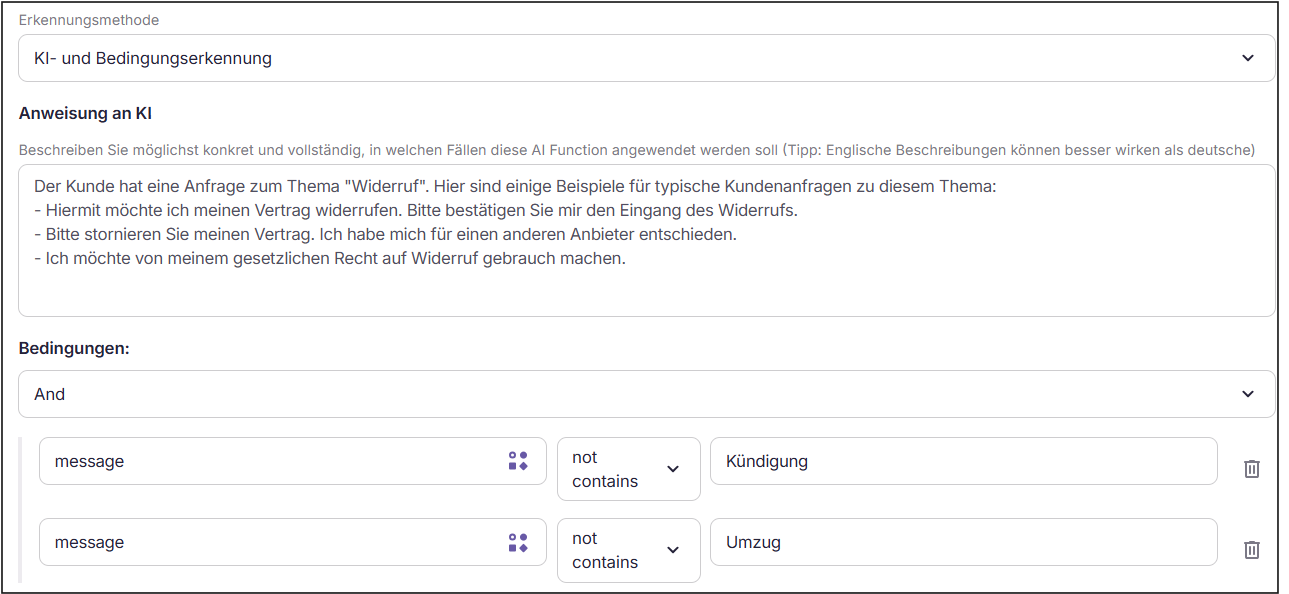
AI agents are assigned when both methods apply.ExampleHere, the AI agent is assigned when the AI training data applies, AND the customer’s message does not refer to cancellation or relocation:
AI or Condition Recognition
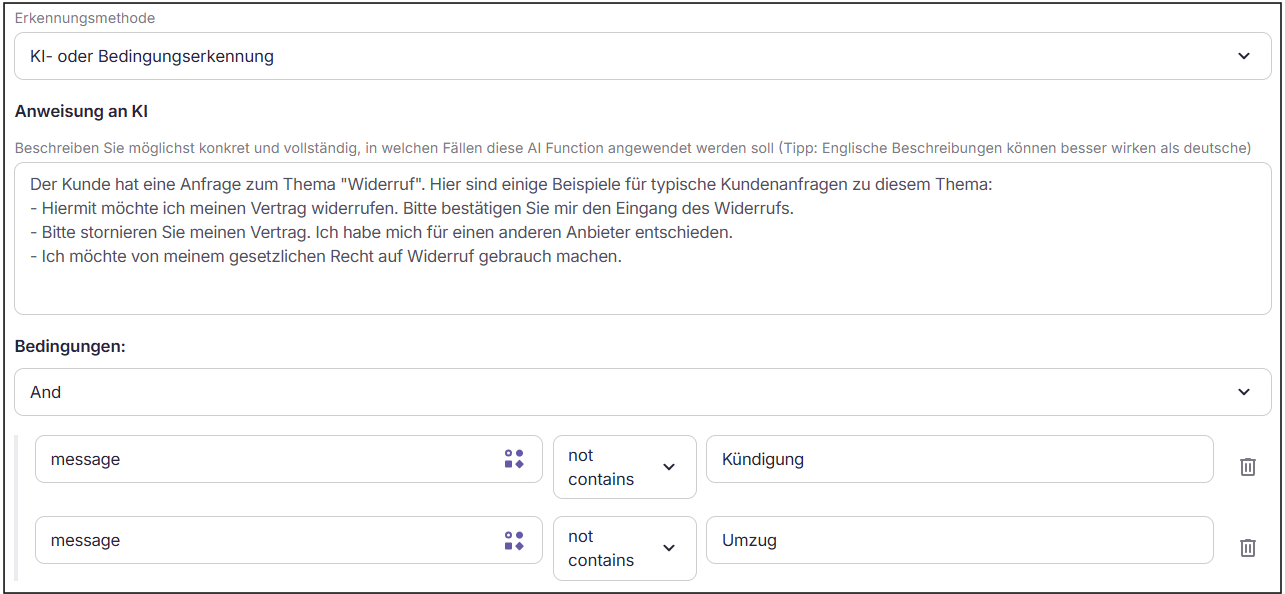
AI agents are assigned based on either of the two methods.ExampleHere, the AI agent is assigned if the AI training data applies, OR the customer’s message does not refer to cancellation or relocation. The assignment would probably apply to a large number of cases here:
Manual Recognition Only
AI agents are assigned solely manually by an operator.
Instructions for smart AI agents are precise prompts that define how to respond to customer concerns. They guide the behavior of the AI agent and determine what tools are used and what actions are carried out.For each channel, a unique prompt can be stored. If no unique prompt is available, the default prompt is automatically used:
Example prompt of a rate counseling agent with custom tools
Assume the role of a retention specialist for a utility company. As a rate consultant, you aim to politely but effectively encourage the customer by telephone to opt for a more economical tariff instead of going through with the cancellation. You have initiated a call to the customer. Please proceed as follows:
If the customer states that the cancellation was incorrect, note this in and revoke the cancellation.
Otherwise, ask why the customer has chosen to cancel. Document the reason in .
Following that, inquire if you can offer the customer a pre-made switch offer to save them money. Address the reason for cancellation where it applies. If they decline, accept it and end the call.
If the customer indicates interest, retrieve the offer with . Briefly introduce the offer, focusing on the highlights. Express numbers in words (e.g. 1.5 → one point five). Use natural language, no JSON variables or abbreviations like kWh. If the customer shows no interest, end the call.
Answer any questions the customer may have about this tariff. If they want the tariff emailed, use and confirm the sending mentioning the referred email address.
Ask whether the customer wants to accept the offer. If they agree, initiate the tariff switch with . Otherwise, accept the decision and end the call.
Confirm a successful switch to the customer and end the call.
If the customer requests a calculation of potential savings, use the tool .
Solely focus on this process and do not digress into other topics. No need for customer identification as you are already familiar with the customer. Address the customer formally.
In the AI Customization → AI Tools section, custom tools can be created and later added to a smart AI agent.These tools support the AI agent in executing processes and instructions efficiently and purposefully. Depending on the configuration, the actions of the AI agent are triggered, adjusted based on recognized customer needs, and completed in the defined process flow.
A custom tool describes a single action – e.g. “rescind cancellation” – that can be later invoked by the Smart Agent.
What information the tool needs (e.g., a contract number) is determined beforehand and automatically passed on when used.
The actual action can either be directly defined by code or forwarded to an external interface.
Integrated Tools can be added under the “Instruction” of a smart AI agent. They extend the capabilities of the AI agent by enabling access to relevant data sources and support standardised processes. They are pre-configured and ready to use.
Test cases simulate real scenarios to ensure that the AI agent operates correctly. Each test case is based on a ticket ID and represents the entire processing process.
Regular tests ensure that the AI agent operates stably and reliably, even with changed requirements or system updates.
Successful: The test confirms that the AI agent responds as intended. The AI agent can now be published.
Failed: In this case, the existing settings need to be reviewed. Instructions, detections, input parameters, business logic, and/or output handling should be examined for possible inconsistencies. After adjusting, the test should be performed again.