

Example
A service provider handles customer service for several municipal utilities, including Stadtwerke Voltlingen and Stadtwerke Stromhain. The service provider uses the same Enneo instance for both utilities. The team “Stadtwerke Voltlingen” should only see tickets from Stadtwerke Voltlingen.- In the team settings, Restrict displayed tickets by tags is activated.
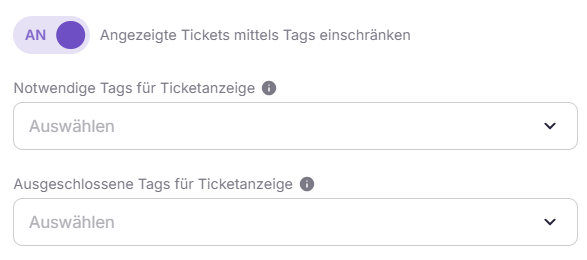
Required tags must be present for a ticket to be opened.
Excluded tags make it so that a ticket can no longer be opened as soon as it is present on the ticket.
Excluded tags make it so that a ticket can no longer be opened as soon as it is present on the ticket.
- For Necessary tags for ticket display, the tag
Client: Stadtwerke Voltlingenis selected.
Client: Stadtwerk Voltlingen are displayed in the backlog and considered by the autopilot. The tickets from Stadtwerke Stromhain remain completely hidden from this team.
Effect of the limitation
The access restriction only affects the ticket overview or the backlog and the smart routing. Users, who inherit their settings from the team, automatically adopt the restrictions set there. The following are not restricted:- Search function in ticket and ticket overview
- Ticket history in the ticket
- direct URL calls of tickets
System Configuration
-
Activate restriction for a team or a user
- Under
Teams or User Management - Activate setting: “Restrict displayed tickets by tag”
- Under
-
Set tags
- Field: “Necessary tags for ticket display” and/or “Excluded tags for ticket display”
- Select desired tags
Best Practices
- The use of tag structures should be clear and consistent, for example
Client_XorProject_Yto facilitate maintenance, evaluation, and error analysis. A variety of categories are available in the General Tags. - Access restrictions should be used to clearly depict responsibilities and protect sensitive data. It is not a substitute for role or rights concepts.